Flutter In-App Purchases End to End: Google Play, App Store and Server-Side Validation
The in_app_purchase integration done properly: the purchase stream from app start, pending states, completing purchases before Play auto-refunds, and the backend validation that makes revenue real.
Nothing humbles a mobile team like in-app purchases. The UI is a button; behind it wait two different stores, three layers of caching, pending transactions, family sharing, and a refund system with opinions. This guide is the map I wish I'd had for Flutter IAP: integrating Google Play Billing and Apple StoreKit through the official in_app_purchase package, and — the part most tutorials skip — validating everything server-side so your revenue numbers are real.
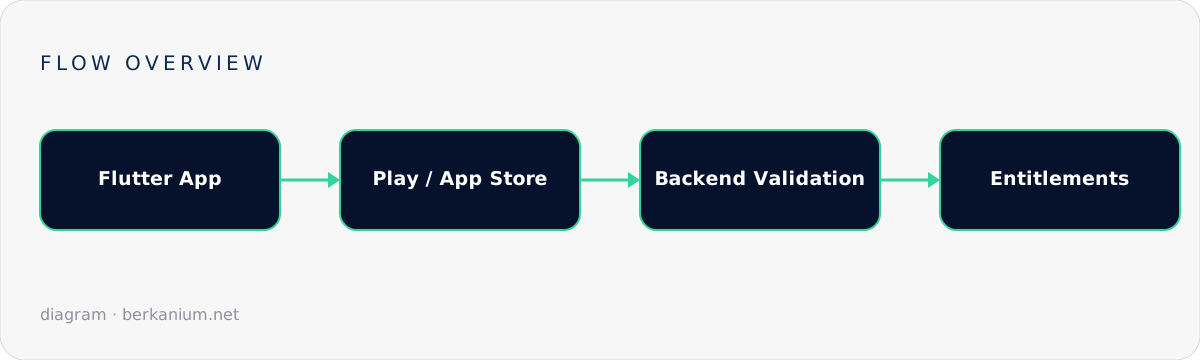
Key takeaways
in_app_purchasegives you one Dart API over StoreKit and Play Billing — but store semantics still differ, and your code must respect both.- The purchase stream is the heart of the integration: listen from app start, because purchases finish when they want to, not when your UI is open.
- Never trust the client. Entitlements are granted by your backend after verifying with Google/Apple server APIs.
- Complete (acknowledge/finish) every purchase — unacknowledged Play purchases auto-refund in 3 days.
Products, offers, and store setup
Before any code: define products in App Store Connect and Google Play Console with matching identifiers (e.g. premium_monthly, premium_yearly, coins_500). Types must agree conceptually — consumable, non-consumable, subscription — because the completion rules differ per type. Test tracks: sandbox testers on iOS, license testers + closed track on Android. Budget a day for console bureaucracy; everyone pays it.
The Flutter side
final iap = InAppPurchase.instance;
late final StreamSubscription<List<PurchaseDetails>> _sub;

@override
void initState() {
  super.initState();
  // 1) Listen FIRST — restored & pending purchases arrive on cold start
  _sub = iap.purchaseStream.listen(_onPurchases, onError: _onError);
}

Future<void> loadProducts() async {
  const ids = {'premium_monthly', 'premium_yearly', 'coins_500'};
  final response = await iap.queryProductDetails(ids);
  // response.notFoundIDs → misconfigured store console, not a code bug
  setState(() => products = response.productDetails);
}

Future<void> buy(ProductDetails product) async {
  final param = PurchaseParam(productDetails: product);
  product.id == 'coins_500'
      ? await iap.buyConsumable(purchaseParam: param)
      : await iap.buyNonConsumable(purchaseParam: param); // subs use this too
}
And the part that decides whether you get paid correctly — the stream handler:
Future<void> _onPurchases(List<PurchaseDetails> purchases) async {
  for (final p in purchases) {
    switch (p.status) {
      case PurchaseStatus.pending:
        showPendingUi();                    // e.g. Play "slow" test cards, Ask-to-Buy
        break;

      case PurchaseStatus.purchased:
      case PurchaseStatus.restored:
        // 2) Server decides. Send the token, wait for the verdict.
        final ok = await api.verifyPurchase(
          store: Platform.isIOS ? 'app_store' : 'play',
          productId: p.productID,
          verificationData: p.verificationData.serverVerificationData,
        );
        if (ok) await entitlements.refresh();
        break;

      case PurchaseStatus.error:
        if (p.error?.code != 'purchase_cancelled') reportToSentry(p.error);
        break;

      case PurchaseStatus.canceled:
        break;
    }

    // 3) ALWAYS complete — Play refunds unacknowledged purchases after 3 days
    if (p.pendingCompletePurchase) await iap.completePurchase(p);
  }
}
Server-side validation: where trust lives
Client-side "premium unlocked" flags are patched out of APKs within hours of any app getting popular. The backend flow:
| Google Play | Apple | |
|---|---|---|
| What the app sends you | purchaseToken | the transaction's jws / receipt data |
| You verify with | Play Developer APIpurchases.subscriptionsv2.get | App Store Server APIGET /inApps/v1/transactions/{id} |
| Ongoing truth | Real-Time Developer Notifications (Pub/Sub) | App Store Server Notifications v2 (webhook) |
// Backend sketch (.NET): one endpoint, two verifiers, one entitlement store
[HttpPost("iap/verify")]
public async Task<IActionResult> Verify(VerifyRequest req)
{
    var result = req.Store switch
    {
        "play"      => await playVerifier.VerifyAsync(req.ProductId, req.Token),
        "app_store" => await appleVerifier.VerifyAsync(req.Token),
        _           => VerificationResult.Invalid(),
    };

    if (!result.IsValid) return BadRequest();

    // Idempotent by original transaction id — replays and restores are normal
    await entitlements.GrantAsync(
        userId: User.GetId(),
        productId: result.ProductId,
        expiresAt: result.ExpiresAt,          // null for lifetime purchases
        originalTransactionId: result.OriginalTransactionId);

    return Ok(new { active = true, expiresAt = result.ExpiresAt });
}
Then subscribe to both stores' server notifications so renewals, cancellations, refunds and grace periods update entitlements without the app being open. That webhook pair is your subscription state's heartbeat.
The checklist teams learn the hard way
- Listen to
purchaseStreamfrom app launch — not from the paywall screen. - Handle
pending(Ask to Buy, slow cards) with real UI. - Restore purchases: a visible button on iOS (App Review requires it), automatic reconciliation on both.
- Idempotent grants keyed on original transaction id — restores must not double-grant coins.
- Sandbox subscriptions renew in minutes — perfect for testing expiry logic before launch.
- Map store-specific refunds/revocations (webhooks) to entitlement removal, or refunded users keep premium forever.
FAQ
Do I need my own backend for a simple one-time unlock?
Technically no, honestly yes. Without server validation you can't fight patched clients, can't handle refunds, and can't share entitlements across devices or platforms.
Should I use RevenueCat/Adapty instead of raw stores?
If subscriptions are your business model, a subscription platform pays for itself in webhook plumbing alone — see my companion piece on integrating Adapty with a .NET backend.
How do I test Play billing before release?
Upload to a closed testing track, add license testers, and use the test payment methods (including "always declines" and "slow" cards) — the pending path is one config away.
Next steps
Monetization code is trust code. If your Flutter app's revenue depends on getting this right, bring me the project — or grab a review session on your existing IAP flow before the next launch.