OneSignal End to End: SDK, Segments and the Backend That Sends
External IDs as the one crucial decision, the logout() that prevents privacy incidents, permission etiquette that triples opt-ins, REST sends with collapse keys, and the delivery feedback loop everyone skips.
Push notification providers are a commodity until you actually integrate one, at which point the differences get personal: how token churn is handled, whether web push is an afterthought, how much the dashboard lets non-engineers do without filing tickets. OneSignal's pitch is breadth — iOS, Android, web push, email and SMS under one roof with a generous free tier — and after wiring it into several products (Flutter and native mobile, Laravel and .NET backends), here's the integration guide with the gotchas pre-labeled.
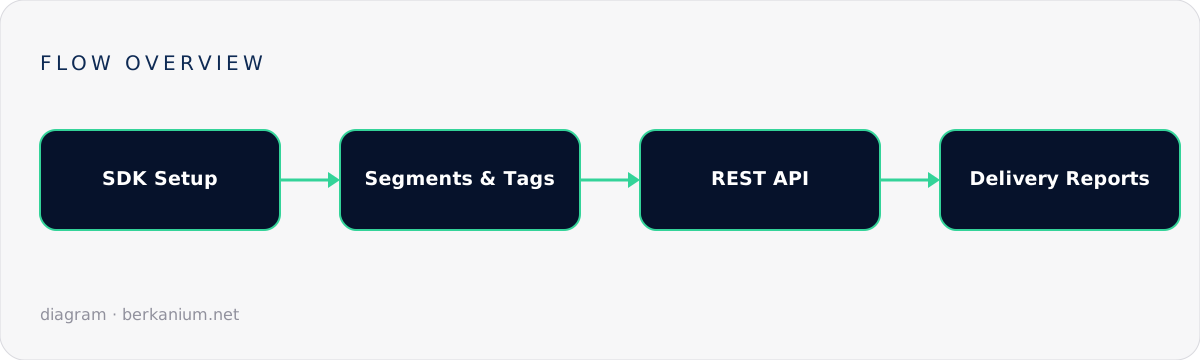
The mental model: players, segments, and one crucial ID
OneSignal's world revolves around the subscription (a device/browser endpoint) grouped under a user. The single most important integration decision happens on day one: set your own user ID as the External ID. Without it, OneSignal knows devices; with it, OneSignal knows your users, and your backend can target external_id: "user_8841" without ever tracking device tokens yourself:
// Flutter — after your own auth succeeds:
await OneSignal.login(user.id.toString());          // External ID = your PK
await OneSignal.User.addTags({
  'plan': user.plan,                                 // segmentation fuel
  'locale': user.locale,
  'merchant_id': user.merchantId.toString(),
});
// And on logout — forgetting this = pushing user A's data to user B's phone:
await OneSignal.logout();
That logout line has caused more privacy incidents than any other omission in this post. Shared devices are real; wire logout() into your sign-out flow the same day you wire login().
Platform setup, compressed to the sharp edges
- iOS: APNs key (the .p8, not certificates — keys don't expire), Push capability in Xcode, and the Notification Service Extension if you want images/badging done right. Test on a physical device; the simulator's push story remains fictional.
- Android: Firebase project → service account JSON into OneSignal. Android 13+ made notification permission a runtime prompt — so the "when to ask" UX (below) now applies everywhere, not just iOS.
- Web push: the OneSignal service worker file at your origin root, HTTPS mandatory. The integration is easy; the etiquette isn't — browsers that ask for push permission on first pageview get blocked forever by ~70% of users. Gate the native prompt behind an in-context ask ("Want order updates?") and your opt-in rate triples. This applies to apps too: never ask cold; ask after demonstrated value, in context. Permission is a one-shot resource — spend it like one.
Sending from the backend: the REST API
Dashboard sends are for marketing; transactional pushes come from your code. The shape, from a Laravel service (identical logic in .NET with HttpClient):
final class OneSignalChannel
{
    public function send(User $user, PushMessage $msg): void
    {
        Http::withToken(config('services.onesignal.rest_key'))
            ->post('https://api.onesignal.com/notifications', [
                'app_id' => config('services.onesignal.app_id'),
                'include_aliases' => ['external_id' => [(string) $user->id]],
                'target_channel' => 'push',
                'headings' => ['en' => $msg->title, 'tr' => $msg->titleTr],
                'contents' => ['en' => $msg->body, 'tr' => $msg->bodyTr],
                'data' => ['deep_link' => $msg->deepLink],       // routing payload
                'collapse_id' => $msg->collapseKey,              // newer replaces older
                'ios_badgeType' => 'Increase', 'ios_badgeCount' => 1,
            ])->throw();
    }
}
Wrap it as a custom Laravel notification channel and it slots into the same Notification classes as mail — one via() array, many channels, which becomes important in the system-design post. Notes on the payload: localized content keyed by language beats server-side language branching; collapse_id stops "3 status updates" from stacking as three notifications; and the data block is your deep-link contract with the mobile app — version it as carefully as any API, because old app versions will receive new payloads for years.
Segments and tags: who gets what
Tags (set from the SDK above) power dashboard segments — "plan = pro AND last_session > 7 days ago" — which is precisely the layer that lets marketing run re-engagement campaigns without engineering tickets. The division of labor that keeps everyone sane: transactional = API from your backend, targeted by External ID; behavioral/marketing = segments in the dashboard, owned by whoever owns the copy. Resist the urge to route transactional sends through segments — segment membership lags, and "your order shipped" tolerates zero lag.
The feedback loop everyone skips
Sending is half the integration. The other half: webhooks and exports back into your system. OneSignal can call your endpoint on delivery/click events — land those in your database (through a properly verified webhook handler, naturally) and you can answer the questions that actually matter: which notification types get opened, which get users to disable push entirely (the silent churn metric), and whether that Tuesday campaign correlated with the uninstall spike. Also handle the unsubscribed state honestly — a user who disabled push should degrade to email or in-app, not into silence; that fallback routing is, again, the next post's whole subject.
The checklist
- External ID = your user PK;
logout()wired; tags for plan/locale/tenant ✔ - Permission asked in context, never on cold start ✔
- Transactional via REST + External ID; marketing via segments ✔
- Deep-link payload treated as a versioned contract ✔
- Delivery/click webhooks captured; opt-out fallback defined ✔
The token-lifecycle mechanics underneath all this — permission states, stale tokens, deep-link routing — get their own deep dive in the next post. Or skip ahead and have me wire the whole thing.