DSFinV-K Exports with fiskaly: Cash Point Closings Done Right
The export a German tax auditor actually asks for: master data setup, asynchronous cash point closing ingestion with its validation gotchas, and one-click TAR exports from your admin panel.

When a German tax auditor visits a cash-based business, they don't ask for your database schema — they ask for a DSFinV-K export: a standardized bundle of CSV files describing every transaction, every VAT split and every cash-point closing, in the exact structure the Digitale Schnittstelle der Finanzverwaltung für Kassensysteme prescribes. The fiskaly DSFinV-K API turns that format from a 100-page PDF into a REST workflow. This article covers the data model, the cash-point-closing lifecycle, and how to generate audit-ready exports on demand.
Key takeaways
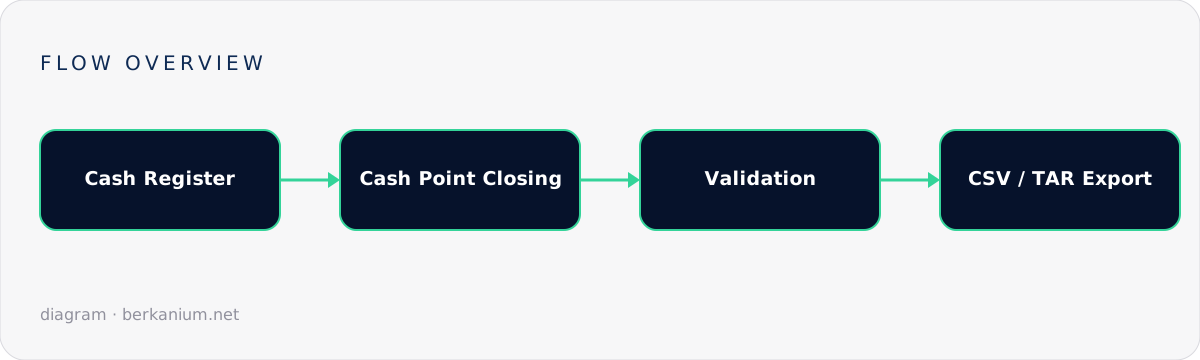
- The central aggregate is the cash point closing — the Z-report of a register for a period, with sequential Z-NR numbering.
- Master data first: cash registers (MASTER/SLAVE), VAT definitions, and purchaser agencies must exist before closings reference them.
- Closings are ingested asynchronously (
PENDING → WORKING → COMPLETED | ERROR) — only COMPLETED closings can be exported. - Exports arrive as TAR/ZIP of CSVs per DSFinV-K 2.3 — exactly what the auditor's IDEA software expects to import.
The data model
| Resource | Role | Notes |
|---|---|---|
| Cash register | A physical device | MASTER manages SLAVE terminals; linked by client ids |
| VAT definition | Tax-rate mapping | IDs 1–7 are predefined (19%, 7%, …); 1000+ are yours to define |
| Purchaser agency | Third party you collect revenue for | Think concert tickets sold at your counter |
| Cash point closing | The period aggregate | Transactions, payment types, cash flow, VAT allocation, Z-NR |
| Export | The audit artifact | TAR/ZIP of CSVs, filtered by date or client |
Step 1 — Master data
# JWT auth, same pattern as the other fiskaly APIs
curl -X POST https://dsfinvk.fiskaly.com/api/v1/auth \
  -d '{"api_key": "...", "api_secret": "..."}'

# Register the till
curl -X PUT .../api/v1/cash_registers/$CLIENT_ID -d '{
  "cash_register_type": { "type": "MASTER" },
  "brand": "YourPOS", "model": "v3",
  "base_currency_code": "EUR",
  "software": { "brand": "YourPOS" }
}'

# Custom VAT definition beyond the predefined 1–7
curl -X PUT .../api/v1/vat_definitions/1001 -d '{
  "percentage": 10.7, "description": "Landwirtschaftliche Produkte"
}'
Step 2 — Submit cash point closings
At the end of each business day (or shift), your POS aggregates the day and submits one closing per register. The payload is the deep one in this API — transactions with business cases, amounts per VAT rate, and payment types — and ingestion is asynchronous:
// Illustrative C#: submit, then poll the validation state
var closingId = Guid.NewGuid();

await api.PutAsJsonAsync($"/cash_point_closings/{closingId}", new {
    client_id = registerId,
    cash_point_closing_export_id = zNumber,      // sequential Z-NR
    head = new {
        business_date = "2026-09-01",
        first_transaction_export_id = "1",
        last_transaction_export_id = "214",
    },
    cash_statement = new {
        payment = new {
            full_amount = "4321.90",
            cash_amount = "1201.40",
            payment_types = new[] {
                new { type = "CASH", currency_code = "EUR", amount = "1201.40" },
                new { type = "ECARD", currency_code = "EUR", amount = "3120.50" },
            }
        }
    },
    transactions = dayTransactions,              // the real bulk
});

var state = await PollUntilAsync(
    () => api.GetStateAsync($"/cash_point_closings/{closingId}"),
    s => s is "COMPLETED" or "ERROR");

if (state == "ERROR")
    compliance.Alert(await api.GetValidationErrorsAsync(closingId));
Field-level gotchas that surface in validation:
- Serial numbers: ≤ 70 characters, no slashes or underscores (DSFinV-K 2.3).
- Z-NR must be strictly sequential per register — gaps are questions an auditor will ask.
- Amounts are strings with fixed decimal formatting; don't let your JSON serializer "help" with floats.
- Only uncompleted closings can be deleted — model corrections as new closings, not edits.
Step 3 — Exports on demand
# Trigger, filtered by business date range
curl -X PUT .../api/v1/exports/$EXPORT_ID -d '{
  "start_date": "2026-01-01", "end_date": "2026-09-01"
}'

# Poll, then download
curl .../api/v1/exports/$EXPORT_ID
curl -o dsfinvk.tar .../api/v1/exports/$EXPORT_ID/download
Build this into your product's admin as "Download audit export" with a date picker. The retailer who can hand the auditor a USB stick in five minutes has a very different audit experience from the one who needs "a few days".
How this fits with SIGN DE
The two APIs answer different auditor questions: SIGN DE proves each transaction was signed at the time it happened (TSE log export); DSFinV-K proves the books add up (structured business data). A complete German fiscalization stack ships both — plus the §146a declaration so the authorities even know your tills exist.
FAQ
Do I submit closings in real time?
No — a closing is inherently end-of-period. Real-time is the TSE's job; DSFinV-K is the bookkeeping aggregate. Daily submission right after your Z-report is the sweet spot.
What if validation fails on day 200?
Fix the data and submit a corrected closing; keep the failed attempt's error report. Systematic validation failures are a data-model smell in your POS aggregation — worth a design review.
Can one export cover multiple registers?
Yes — filter by date range and optionally by client id. Per-store exports (one register set per establishment) map most cleanly to how audits are scoped.
Next steps
If you're building a POS or vertical SaaS touching the German market, fiscalization is a launch blocker best handled early. Book an architecture session or brief me on your project — I've mapped these regulatory flows so you don't have to learn them the audited way.