EftPeer Operations in pepperQik: Purchases, Reversals and End-of-Day Explained
The EftPeer operation lifecycle from a POS developer's seat: connect and login, purchase outcomes, reversal vs refund, recovery queries and the end-of-day settlement everyone forgets.
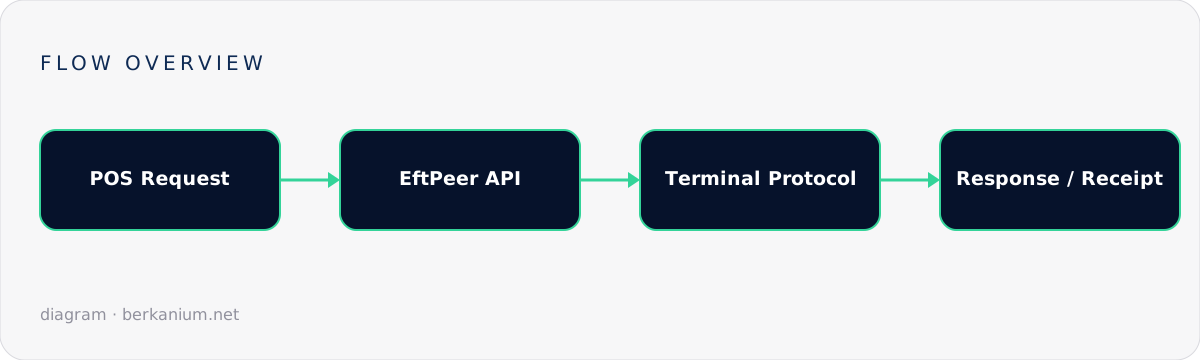
Every payment middleware has a core abstraction. In the pepper world it's the EftPeer — the object that represents "a payment terminal you can talk to". Once you hold an EftPeer, everything a checkout ever needs is an operation on it: open the connection, run a purchase, refund yesterday's mistake, reverse the transaction that just went sideways, and close the day with a settlement. This article walks through the operation lifecycle the way a POS developer actually experiences it, with the failure modes that only show up in production.
Key takeaways
- Think of an EftPeer as a stateful session with a terminal, not a stateless HTTP endpoint.
- The big five operations: connect/login, purchase, refund, reversal, end-of-day. Master these and 95% of retail flows are covered.
- A reversal is not a refund — mixing them up costs real money and real reconciliation pain.
- Design your POS around operation results, including the third result nobody plans for: unknown.
The operation lifecycle
Terminal sessions follow a strict choreography. A typical day at one checkout lane looks like this:
┌ Morning ────────────────────────────────────────────┐
│ connect() → login()          terminal ready         │
├ Trading hours ──────────────────────────────────────┤
│ purchase(24.90) → approved   receipt printed        │
│ purchase(9.50)  → declined   cashier asks for cash  │
│ refund(24.90)   → approved   customer changed mind  │
│ purchase(120.0) → timeout!   → reversal() → cleared │
├ Evening ────────────────────────────────────────────┤
│ endOfDay()      totals match acquirer settlement    │
│ logout() → disconnect()                             │
└─────────────────────────────────────────────────────┘
Three properties of this choreography bite integrators who ignore them:
- One operation at a time. The terminal is a physical device with one screen and one cardholder in front of it. Serialize your requests; a queue in the POS beats a busy-error storm.
- Operations are long-running. A purchase includes a human fishing a card out of a wallet. Timeouts must be generous (60–120s is normal) and cancellation must be explicit, not a dropped socket.
- Login state matters. Most terminals require a login/activation before financial operations and will reject a purchase after a connection loss until you re-login.
Purchase: the happy path (and its shadow)
An illustrative purchase against a pepperQik-style API:
var op = await peer.ExecuteAsync(new PurchaseRequest
{
    Amount = Money.Chf(24.90m),
    Reference = "TICKET-4711"
});

switch (op.Outcome)
{
    case Outcome.Approved:
        await pos.CompleteSale(op.AuthCode, op.ReceiptText);
        break;

    case Outcome.Declined:
        pos.ShowDecline(op.DisplayText);   // never invent your own decline text
        break;

    case Outcome.Aborted:                  // cardholder pressed the red button
        pos.ReturnToBasket();
        break;

    case Outcome.Unknown:                  // timeout, crash, cable pulled
        await RecoverLastTransaction(peer); // ask the terminal what happened
        break;
}
The Unknown branch is where careers are made. When the response never arrives, the money may or may not have moved. The only correct move is a last-transaction / recovery query: ask the terminal for the result of the most recent operation and reconcile your POS state against the truth on the device. Ship this on day one, not after the first support ticket.
Refund vs. reversal — know the difference
| Reversal | Refund | |
|---|---|---|
| When | Same session, typically the last transaction, before settlement | Any time after, even days later |
| What it does | Voids the authorization as if it never happened | Creates a new, opposite transaction |
| Cardholder sees | Usually nothing (hold disappears) | A credit on the statement |
| Fees | Generally none | Often full interchange |
| Use it for | Timeouts, cashier error caught immediately | Returns, complaints, goodwill |
The operational rule: if the drawer hasn't closed yet, reverse; otherwise refund. Wire your POS "cancel last payment" button to reversal and hide the refund flow behind a supervisor role — you'll thank yourself at reconciliation time.
End-of-day: the operation everyone forgets
The end-of-day (balance / settlement) operation closes the terminal's batch, transmits totals to the acquirer and resets counters. Skipping it doesn't break payments — it breaks accounting: settlements drift across days, and matching acquirer payouts to till reports turns into archaeology. Automate it:
// Run automatically when the shift closes — never rely on humans
var balance = await peer.ExecuteAsync(new EndOfDayRequest());

if (!balance.TotalsMatch(pos.CardTotalsForShift()))
    alerting.Raise("EOD mismatch", balance.Diff);  // investigate TONIGHT, not at month-end
Designing the POS side
- Model operations as a state machine: Idle → InFlight → (Approved | Declined | Aborted | Unknown). Forbid a second InFlight.
- Persist before you send. Write "payment attempt started" to disk before calling the terminal, so a POS crash can resume recovery.
- Print what the terminal gives you. Receipt text from the middleware is scheme-compliant; your hand-rolled version probably isn't.
- Log the operation trail with references, not PANs. Disputes are won with timestamps.
FAQ
Can I run a purchase and a refund concurrently on one terminal?
No — one cardholder, one screen, one operation. Concurrency belongs above the EftPeer, as a queue.
How long should my purchase timeout be?
Longer than the slowest human: 60–120 seconds is typical, plus an explicit cashier-facing cancel that triggers an abort operation rather than just abandoning the request.
What if the reversal itself times out?
Recovery query again. The last-transaction result is the single source of truth; keep querying (with back-off) until you get a definitive answer, and alert a human if the terminal stays unreachable.
Further reading
The authoritative operation reference is the EftPeer operations documentation. For the deployment side, see running pepperQik as a Windows service and in Docker. Building a POS and want these flows implemented properly the first time? Let's talk.