Deploying pepperQik as a Windows Service: A Field Guide for POS Integrators
How to run Treibauf's pepperQik EFT middleware as a Windows service: installation, service accounts, crash recovery, firewall scoping and the operational checklist before go-live.
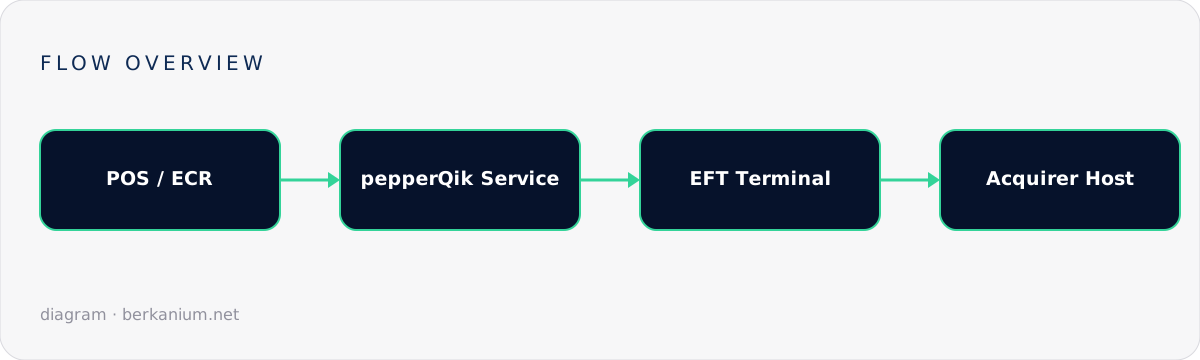
If you build point-of-sale software in Europe, sooner or later you meet pepper — Treibauf's battle-tested middleware that speaks the native protocols of hundreds of EFT payment terminals so your POS doesn't have to. Its modern incarnation, pepperQik, runs as a standalone service that your cash register talks to over a clean local API. The most common way to ship it on classic checkout hardware is as a Windows service — and that deployment model is exactly what this guide covers.
Key takeaways
- pepperQik decouples your POS from terminal-vendor protocols (ZVT, EP2, OPI and friends) behind one consistent API.
- Running it as a Windows service gives you automatic start on boot, crash recovery and clean lifecycle management — essential on unattended checkout lanes.
- Service accounts, firewall scoping and log rotation are the three things integrators most often get wrong.
- Always test the failure path: what happens to an in-flight payment when the service restarts mid-transaction?
Why a Windows service and not a console app?
A checkout lane is a hostile environment: power cuts, forced reboots after Windows updates, cashiers who close windows they shouldn't. A console process that someone has to remember to start does not survive contact with retail reality. A Windows service does, because the Service Control Manager (SCM) guarantees three things your payment flow depends on:
- Automatic start — the service is up before the cashier logs in, so the first transaction of the day never races the middleware boot.
- Recovery policies — the SCM restarts the process automatically if it crashes, with configurable back-off.
- Session isolation — the service runs in session 0, independent of any interactive user, which also keeps it alive across cashier logouts.
Installing the service
After running the pepperQik installer on the checkout PC, the service is registered for you in most setups. When you need to script it — for example in a fleet rollout with hundreds of lanes — the classic Windows tooling applies. The pattern looks like this (adjust binary path and service name to your installation):
# Register the service (fleet rollout script)
sc.exe create PepperQik `
  binPath= "C:\Program Files\Treibauf\pepperQik\pepperqik.exe" `
  start= auto `
  DisplayName= "pepperQik EFT Service"

# Configure crash recovery: restart after 5s, then 30s, then 60s
sc.exe failure PepperQik reset= 86400 actions= restart/5000/restart/30000/restart/60000

# Start it
sc.exe start PepperQik
Two details matter more than they look:
- The service account. Run under a least-privilege account —
NT SERVICE\PepperQikor a dedicated local account. The service needs to reach the terminal (LAN or serial) and write its own logs; it does not need admin rights, and on a PCI-scoped machine it definitely should not have them. - Recovery is not idempotence. The SCM will happily restart the process, but your POS must treat a restart mid-payment as an unknown outcome and run the recovery/last-transaction query before doing anything else. More on that in the error-handling guide.
Configuration that survives production
pepperQik keeps its configuration outside your POS, which is a feature: terminal IPs, currency, and acquirer parameters live with the middleware, not sprinkled across your application code. A few rules of thumb from real deployments:
| Concern | Recommendation |
|---|---|
| Terminal address | Static IP or DHCP reservation — never let the terminal wander the subnet. |
| API binding | Bind to 127.0.0.1 when POS and service share the machine; only expose on the LAN if a separate till talks to it, and firewall it to that till. |
| Logs | Keep them on — they are your evidence in every acquirer dispute — but rotate aggressively and mask PAN data (pepper does this by design). |
| Updates | Stage new versions on one lane for a week before fleet rollout. Terminal firmware and middleware versions move together. |
Talking to the service from your POS
With the service running, your POS speaks to a local endpoint instead of a terminal protocol. The integration code becomes refreshingly boring — which is the point. An illustrative purchase call:
// POS-side: one HTTP client, one endpoint, no ZVT in sight
var client = new HttpClient { BaseAddress = new Uri("http://127.0.0.1:8080") };

var response = await client.PostAsJsonAsync("/transactions", new
{
    type = "purchase",
    amount = 2490,          // minor units: 24.90
    currency = "CHF",
    reference = "INV-2026-000871"
});

var result = await response.Content.ReadFromJsonAsync<TransactionResult>();

if (result.Approved)
    PrintReceipt(result.ReceiptText);
else
    ShowDeclineToCashier(result);
Everything protocol-specific — dialect quirks, receipt formatting, EMV flows — stays inside the service. When you swap terminal vendors, your POS code doesn't change.
Operational checklist before go-live
- Service starts automatically after a cold boot and after a Windows update reboot.
- Recovery policy verified by killing the process mid-idle and mid-transaction.
- End-of-day (balance/settlement) runs from the POS, not from someone's memory.
- Firewall allows exactly: POS→service, service→terminal, service→acquirer. Nothing else.
- Log rotation configured; disk-full is a real outage cause on 10-year-old till hardware.
- Clock sync (NTP) enabled — fiscal receipts and settlement windows care about time.
FAQ
Can multiple POS clients share one pepperQik service?
Architecturally the service is the single owner of the terminal session, so concurrent transaction requests must be serialized — one payment at a time per terminal. Multiple lanes mean multiple terminals, each with its own service pairing.
What happens if Windows kills the service during a payment?
The terminal completes or aborts on its own; your POS must ask for the last transaction result on reconnect before starting anything new. Treat "no answer" as "unknown", never as "declined".
Is Docker an alternative on Windows checkout hardware?
On classic Windows tills, the native service is the pragmatic choice. For Linux-based POS, kiosks and cloud-adjacent setups, see the companion piece on running pepperQik in Docker.
Where to go next
The official deployment reference lives in the pepperQik documentation. If you're planning a POS payment integration and want a partner who has shipped these flows in production, tell me about your project — payment middleware is exactly the kind of plumbing I enjoy getting right.